

To write a C component, you need these C component files. You compile these C component files (or C source files) into a DLL.
Method skeletons file – this file contains method routines that read the parameters from the network and call the method. The method skeleton also sends the return status and output parameter data back to the client.
Method prototypes file – this file contains the method declarations only. This file is an included file in the method skeletons file and the method implementation template files.
Method implementation template files – these files contain the method and parameter declarations and an empty method definition. You enter any business logic into the empty method definition.
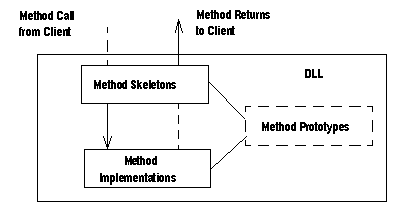
The graphic below illustrates how EAServer calls the DLL’s functions in response to a component methdod invocation:
Figure C-2: How a C component method is called
The sequence of events is:
The client invokes a method using the proxy or stub appropriate to the type of client. The stub or proxy sends the invocation information over the network to the server.
The method skeleton in the method skeletons file unmarshals the call and makes another call to the method implementation in the method implementation template file.
After the method executes, the method implementation returns the call to the method skeleton.
The method skeleton marshals the call and sends the call to the client.
To generate C component files from a package or component, start EAServer Manager and complete these tasks:
Select the component or, if you want to generate files for all components in a package, select the package.
Select File | Generate Stub/Skeleton. The Generate Stubs and Skeletons wizard is displayed.
Select the Generate Skeletons check box. Unless you wish to generate stubs at the same time, deselect Generate Stubs. Enter values in the Skeletons Generation Options area as follows:
C/C++ Code Base
Enter the top-level directory path for the stub files. The path must be a valid UNIX or Windows path. It can include a drive and as many directories as you want.
If you clear the field, the default is the directory specified by $HOME on UNIX and %HOMEPATH% for Windows.
Sybase recommends that you specify the full path to the C code base directory. If you specify a relative path, it is created under the EAServer installation directory, relative to the html/classes subdirectory.
Java Code Base
If you are generating skeletons for a package that contains both Java and C components, specify the location where generated Java skeletons are to be created. Otherwise, you can leave this field alone.
WARNING! Do not use the component name as the method file name. The component name is already used for the method skeletons file.
Click Generate. EAServer Manager generates a method implementation file name, and create and destroy routine templates appended with .new.
Rename the generated method implementation template files, deleting .new.
The component files are named according to this syntax:
file |
file name |
|---|---|
component skeleton |
component-name.c |
method prototypes |
component-name.h |
method implementation |
method-name.c.new |
create routine template |
create.c.new |
destroy routine template |
destroy.c.new |
where
component-name is the name of the component that you defined in EAServer Manager.
method-name can be either of the following:
If you did not specify a name in the Method file name field, files are generated for each method that you defined in EAServer Manager.
If you did specify a method file name, that name is used, and all methods are defined in this file. When specifying a file name, leave off the .c extension.
EAServer Manager creates the directory structure based on the code base that you specify and the component name, as follows:
code_base/jcts_skel/component_name
where:
code_base is the directory name that you specify for the Code Base field in EAServer Manager. If the specified value was not a full path, the directory will be located under the EAServer installation directory, relative to the html/classes subdirectory.
component_name is the component name as displayed in EAServer Manager.
When you add or delete methods or modify component method prototypes, you must regenerate the method skeletons and prototypes. You must manually add, delete, or modify the method in the implementation file. Before you regenerate the method skeletons and prototypes, move your modified implementation files to another directory or rename them so the new implementation template files do not overwrite your modified implementation files.
| Copyright © 2005. Sybase Inc. All rights reserved. |
|
|